登录发现更多内容
首页
分类
发帖
账号
自动登录
找回密码
密码
登录
立即注册
立即登录
立即注册
其他登录
QQ
微信
首页
Portal
求助问答
Xiuno资源
Xiuno教程
Xiuno插件
Xiuno主题
休闲茶馆
定制主题
产品教程
BBS
求助问答
Xiuno资源
Xiuno教程
Xiuno插件
Xiuno主题
休闲茶馆
定制主题
开发资料
求助问答
Xiuno资源
Xiuno教程
Xiuno插件
Xiuno主题
休闲茶馆
定制主题
样品购买
求助问答
Xiuno资源
Xiuno教程
Xiuno插件
Xiuno主题
休闲茶馆
定制主题
IoT云平台
求助问答
Xiuno资源
Xiuno教程
Xiuno插件
Xiuno主题
休闲茶馆
定制主题
GitHub
求助问答
Xiuno资源
Xiuno教程
Xiuno插件
Xiuno主题
休闲茶馆
定制主题
技术博客
求助问答
Xiuno资源
Xiuno教程
Xiuno插件
Xiuno主题
休闲茶馆
定制主题
搜索
搜索
热搜:
LoRa
ESP8266
安信可
本版
帖子
用户
请
登录
后使用快捷导航
没有账号?
立即注册
每日签到
任务
广播
导读
排行榜
设置
我的收藏
退出
6
2
1
首页
PB&TG系列
›
【PB-03F-kit】下载SDK+点灯+烧录(小白向) ...
返回列表
【PB-03F-kit】下载SDK+点灯+烧录(小白向)
[ 复制链接 ]
发布帖子
成为嵌入式高手
高级会员
2
主题
21
回帖
671
积分
高级会员
高级会员, 积分 671, 距离下一级还需 329 积分
高级会员, 积分 671, 距离下一级还需 329 积分
积分
671
私信
6人留言
楼主
PB&TG系列
3140
6
2024-12-2 20:21:55
[i=s] 本帖最后由 成为嵌入式高手 于 2024-12-3 10:26 编辑 [/i]<br /> <br /> > 本帖最后由 成为嵌入式高手 于 2024-12-2 20:20 编辑 > 本帖最后由 成为嵌入式高手 于 2024-12-2 20:12 编辑 > 本帖最后由 成为嵌入式高手 于 2024-12-2 19:44 编辑 > 本帖最后由 成为嵌入式高手 于 2024-12-2 19:06 编辑 大家好,我是成为嵌入式高手(bushi),时隔这么久,我又来发帖了[笑哭][笑哭][笑哭]。非常感谢安信可科技!!!!此教程如存在任何不正确的地方,欢迎各位大佬指出[抱拳] --- # 【PB-03F-kit】下载SDK+烧录+点灯(小白向) 园长在中奖帖里也有一些参考帖。 > [【中奖通知】申请PB-03F开发板的同学看过来! - 活动版块 - 物联网开发者社区-安信可论坛 - Powered by Discuz!]([https://bbs.ai-thinker.com/forum.php?mod=viewthread&tid=45528](https://bbs.ai-thinker.com/forum.php?mod=viewthread&tid=45528)) 今天给大家带来的是PB-03F-Kit的SDK下载、将程序烧录到开发板和点亮一个RGB灯。 ## 1.准备工作 **PB-03F-kit 开发板,MicroUSB数据线一根(我用的是之前电赛TI的数据线)** 开发板的正反面 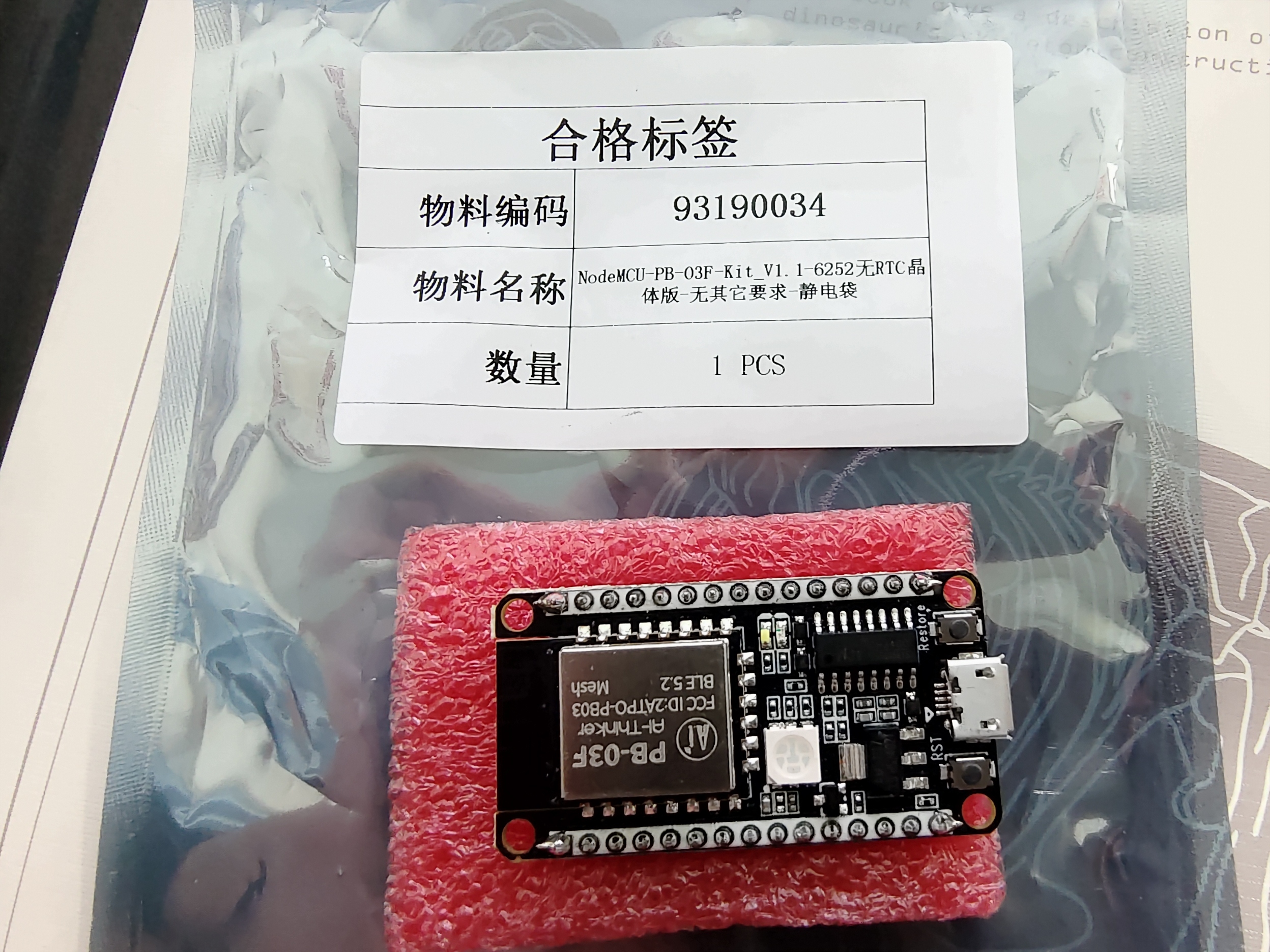 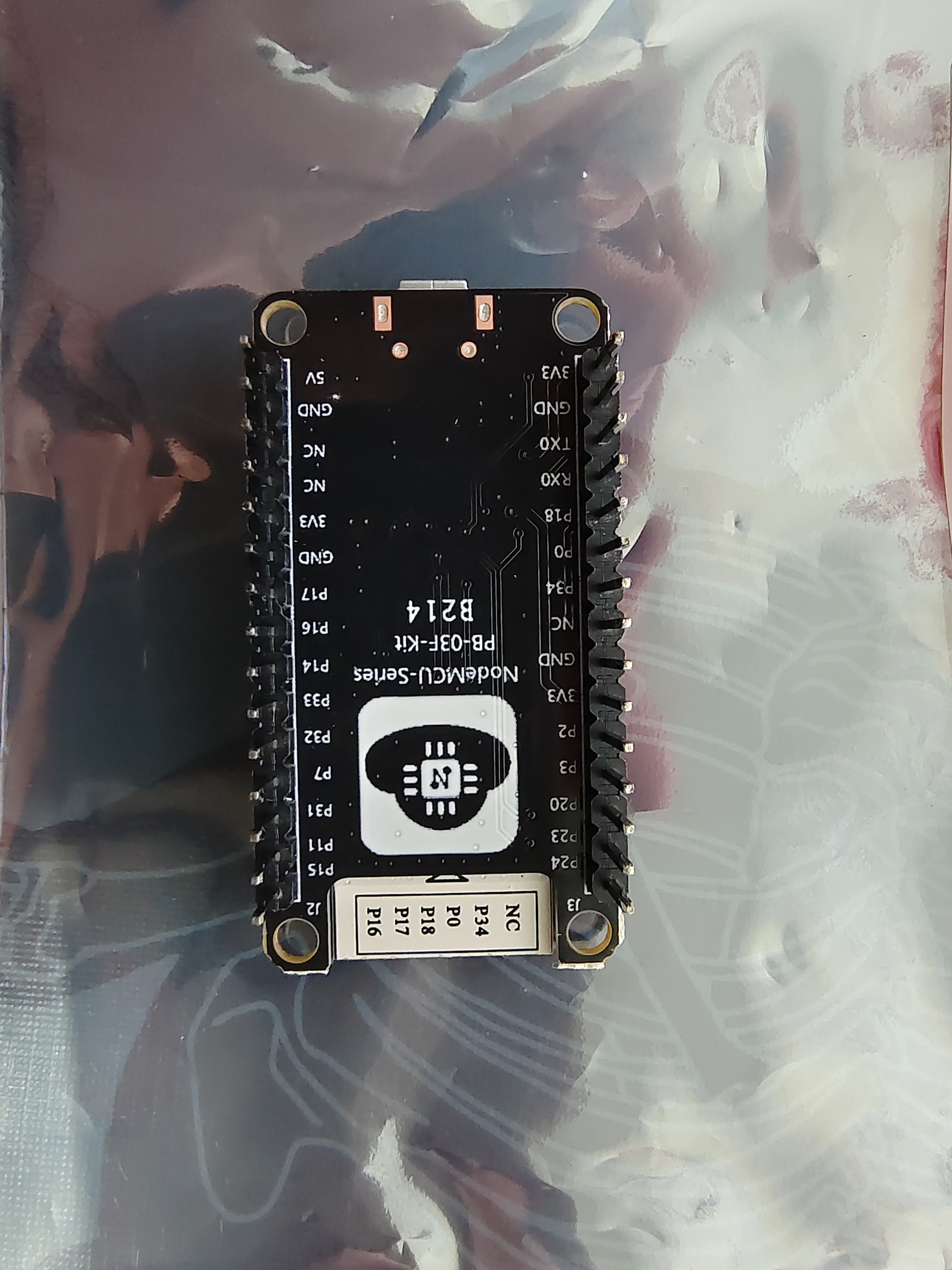 ## 2.下载SDK(前提电脑安装有Keil) 首先来到安信可论坛首页,点击**开发资料** , 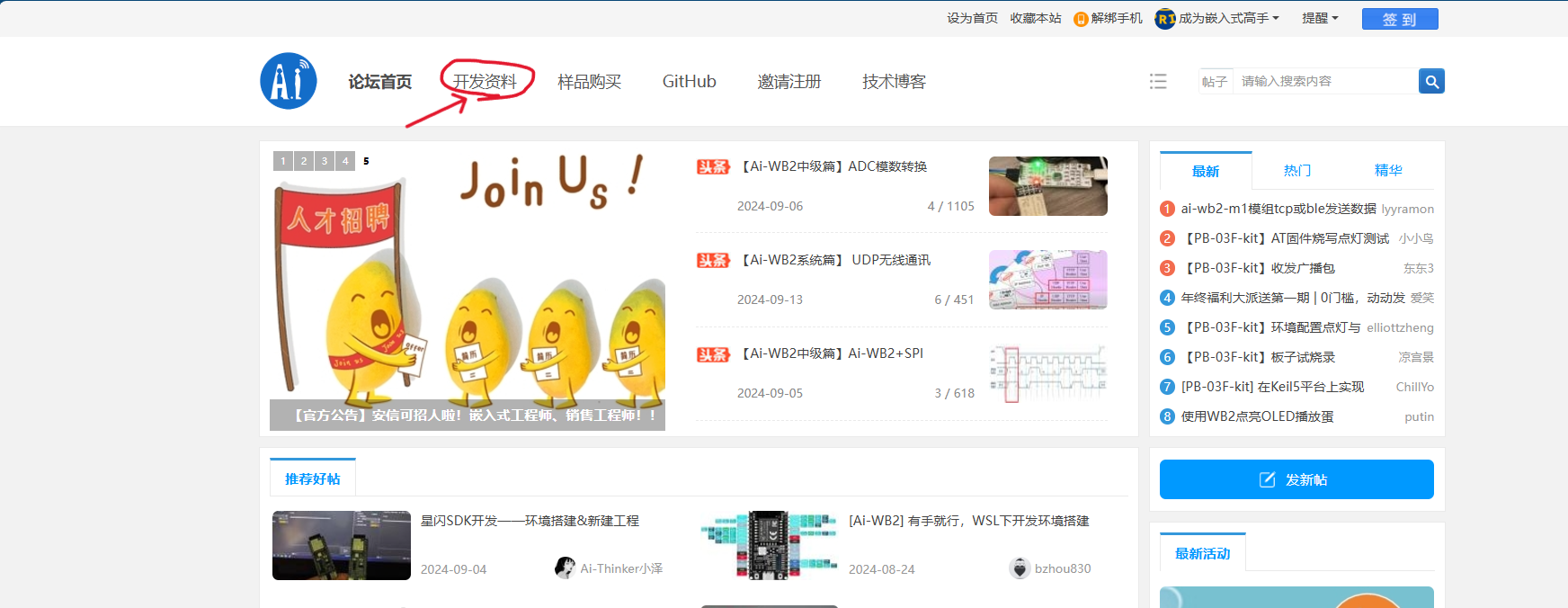 然后点击 **蓝牙模组系列** ----> **奉加PB/TG系列** 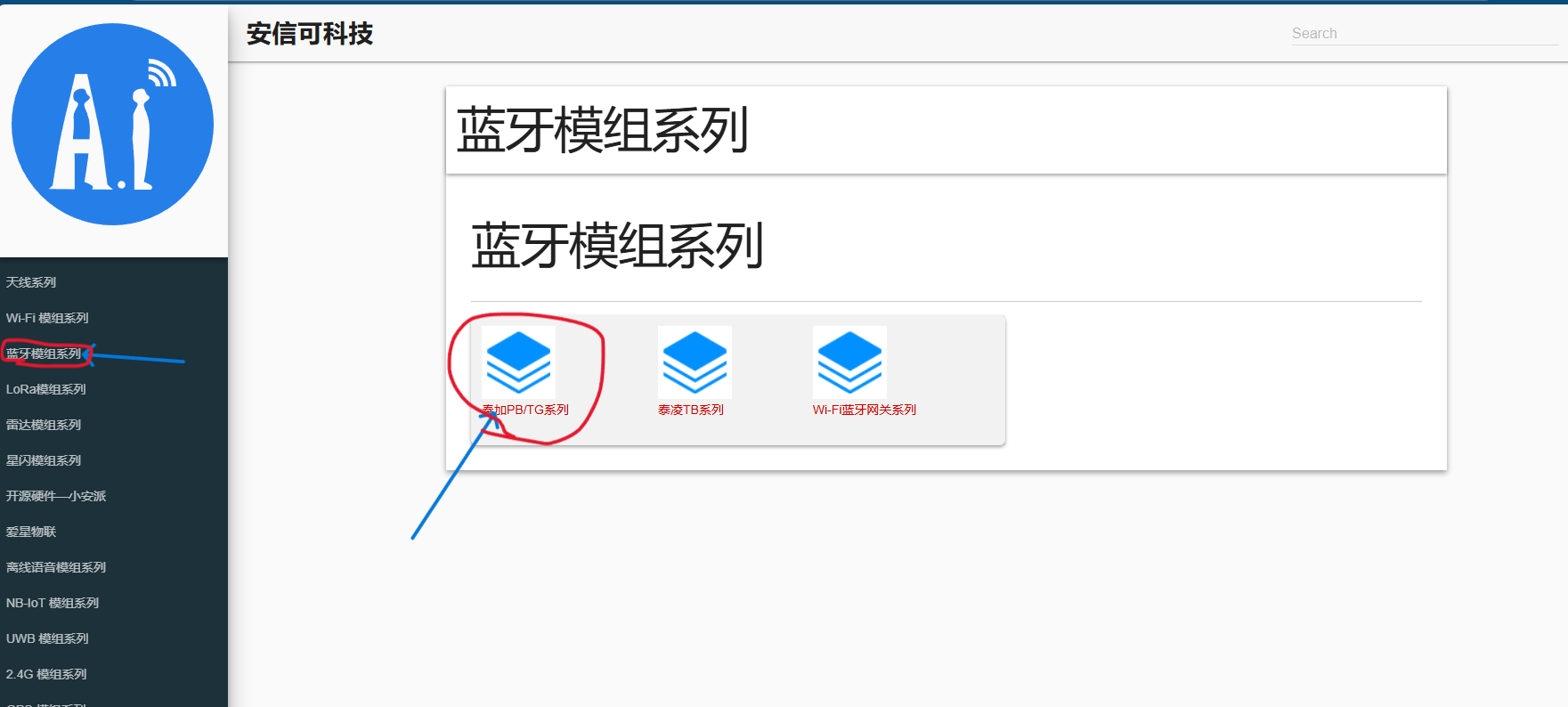 接着下滑找到如图所示的 **3.2 PB-03系列模组应用开发资料** 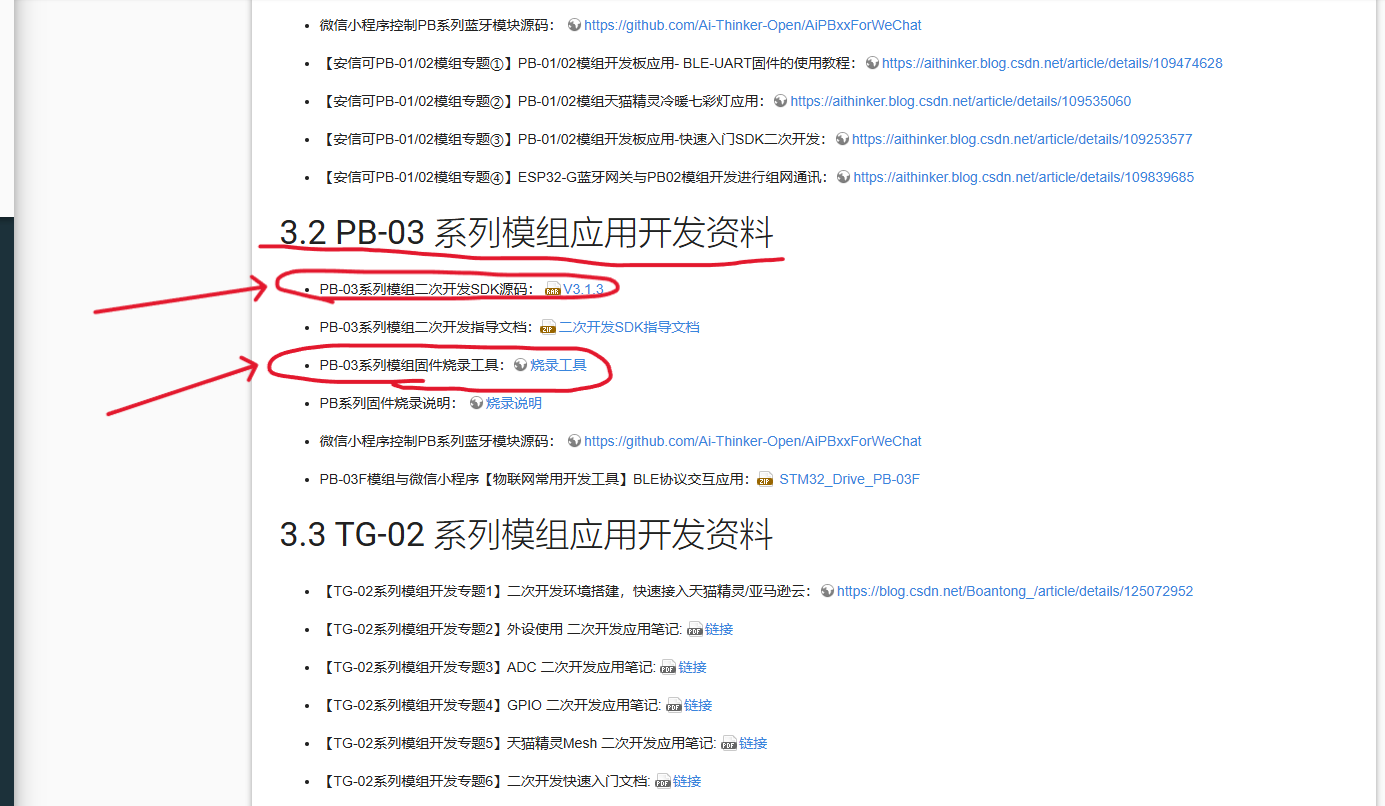 ### 下载箭头所指的两个压缩包即可(Tip) 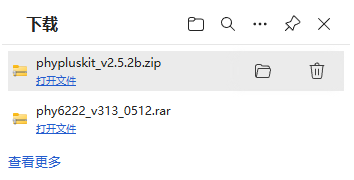 `phypluskit_v2.5.2b` 为烧录工具 `phy6222_v313_0512` 为SDK 记得电脑要提前下好CH340的驱动,否则识别不到开发板 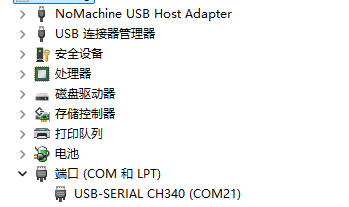 ## 3.打开并修改示例工程 找到SDK文件下的GPIO工程,文件路径如图所示。 `D:\Download\phy6222_v313_0512\example\peripheral\gpio` 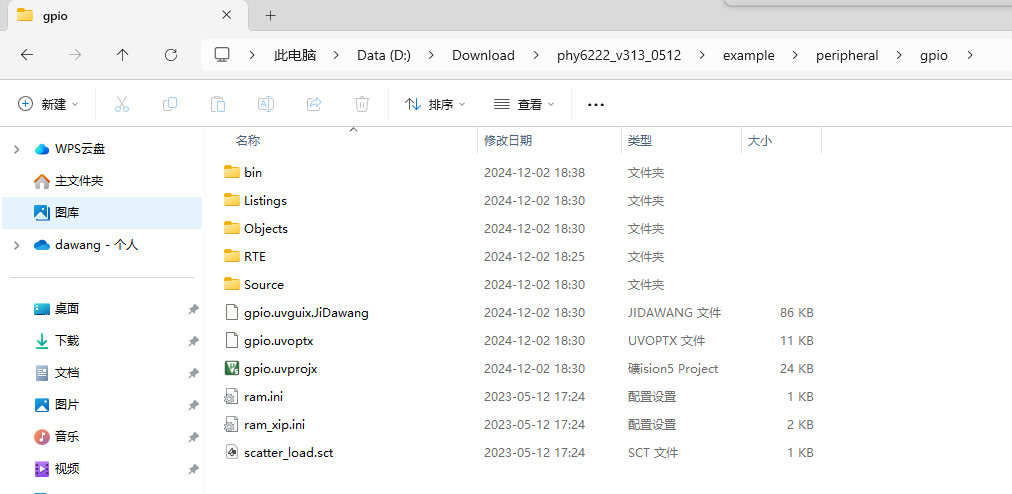 然后,双击 `gpio.uvprojx` Keil工程 打开**app**文件下的 **gpio_demo.c**文件 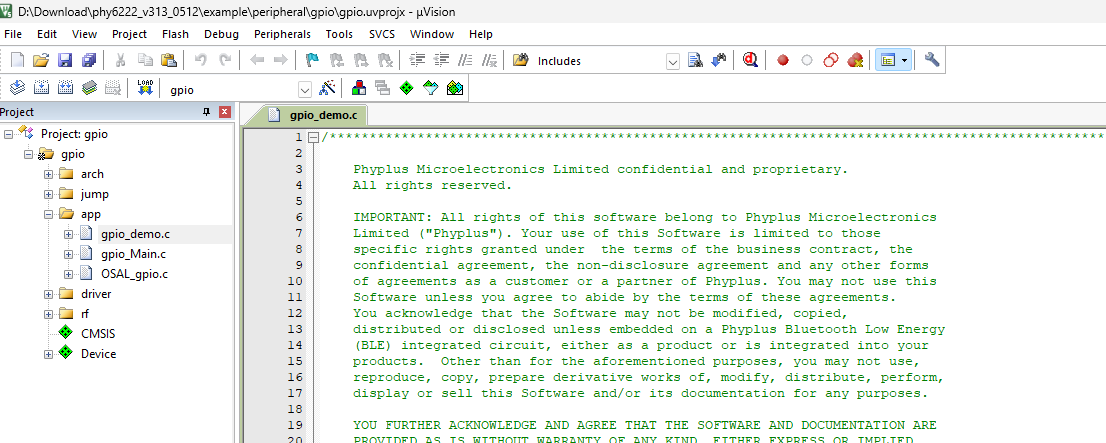 将原来 `void Key_Demo_Init(uint8 task_id)` 函数里面所有代码注释掉或者删除。 添加以下的代码 ``` void { key_TaskID = task_id;// 任务id,不用管 hal_gpio_write(GPIO_P18,HAL_HIGH_IDLE); // GPIO18 输出高电平,点亮LED } ``` 修改后的demo.c 的全部代码为: ``` /************************************************************************************************** Phyplus Microelectronics Limited confidential and proprietary. All rights reserved. IMPORTANT: All rights of this software belong to Phyplus Microelectronics Limited ("Phyplus"). Your use of this Software is limited to those specific rights granted under the terms of the business contract, the confidential agreement, the non-disclosure agreement and any other forms of agreements as a customer or a partner of Phyplus. You may not use this Software unless you agree to abide by the terms of these agreements. You acknowledge that the Software may not be modified, copied, distributed or disclosed unless embedded on a Phyplus Bluetooth Low Energy (BLE) integrated circuit, either as a product or is integrated into your products. Other than for the aforementioned purposes, you may not use, reproduce, copy, prepare derivative works of, modify, distribute, perform, display or sell this Software and/or its documentation for any purposes. YOU FURTHER ACKNOWLEDGE AND AGREE THAT THE SOFTWARE AND DOCUMENTATION ARE PROVIDED AS IS WITHOUT WARRANTY OF ANY KIND, EITHER EXPRESS OR IMPLIED, INCLUDING WITHOUT LIMITATION, ANY WARRANTY OF MERCHANTABILITY, TITLE, NON-INFRINGEMENT AND FITNESS FOR A PARTICULAR PURPOSE. IN NO EVENT SHALL PHYPLUS OR ITS SUBSIDIARIES BE LIABLE OR OBLIGATED UNDER CONTRACT, NEGLIGENCE, STRICT LIABILITY, CONTRIBUTION, BREACH OF WARRANTY, OR OTHER LEGAL EQUITABLE THEORY ANY DIRECT OR INDIRECT DAMAGES OR EXPENSES INCLUDING BUT NOT LIMITED TO ANY INCIDENTAL, SPECIAL, INDIRECT, PUNITIVE OR CONSEQUENTIAL DAMAGES, LOST PROFITS OR LOST DATA, COST OF PROCUREMENT OF SUBSTITUTE GOODS, TECHNOLOGY, SERVICES, OR ANY CLAIMS BY THIRD PARTIES (INCLUDING BUT NOT LIMITED TO ANY DEFENSE THEREOF), OR OTHER SIMILAR COSTS. **************************************************************************************************/ /************************************************************************************************** Filename: gpio_demo.c Revised: $Date $ Revision: $Revision $ **************************************************************************************************/ /********************************************************************* INCLUDES */ #include "OSAL.h" #include "gpio_demo.h" #include "log.h" #include "gpio.h" #include "clock.h" #include "pwrmgr.h" #include "error.h" #include "key.h" /********************************************************************* pulseMeasure_Task Task pulseMeasure sample code,we can use p04~p07 and p11~p15 easily. */ static uint8 pulseMeasure_TaskID; typedef struct { bool enable; bool pinstate; uint32_t edge_tick; } gpioin_Trig_t; typedef struct { GPIO_Pin_e pin; bool type; uint32_t ticks; } gpioin_pulse_Width_measure_t; gpioin_pulse_Width_measure_t measureResult = { .pin = GPIO_P14, }; static gpioin_Trig_t gpioTrig = { .enable = FALSE, .edge_tick = 0, }; void plus_edge_callback(void) { LOG("pulse:%d %d\n",measureResult.type,measureResult.ticks); } void pulse_measure_callback(GPIO_Pin_e pin,IO_Wakeup_Pol_e type) { if(gpioTrig.enable == FALSE) { gpioTrig.enable = TRUE; gpioTrig.edge_tick = hal_systick(); return; } measureResult.type = type; measureResult.ticks = hal_ms_intv(gpioTrig.edge_tick); plus_edge_callback(); gpioTrig.edge_tick = hal_systick(); } void Pulse_Measure_Init( uint8 task_id ) { pulseMeasure_TaskID = task_id; hal_gpio_init(); hal_gpioin_register(measureResult.pin,pulse_measure_callback,pulse_measure_callback); gpioTrig.pinstate = hal_gpio_read(measureResult.pin); } uint16 Pulse_Measure_ProcessEvent( uint8 task_id, uint16 events ) { if(task_id != pulseMeasure_TaskID) { return 0; } // Discard unknown events return 0; } /********************************************************************* gpio_wakeup_Task Task gpio wakeup sample code The followinng code shows P14 wakeup the system when there is a posedge or negedge. */ static uint8 gpio_wakeup_TaskID; void posedge_callback_wakeup(GPIO_Pin_e pin,IO_Wakeup_Pol_e type) { if(type == POSEDGE) { LOG("wakeup(pos):gpio:%d type:%d\n",pin,type); } else { LOG("error\n"); } } void negedge_callback_wakeup(GPIO_Pin_e pin,IO_Wakeup_Pol_e type) { if(type == NEGEDGE) { LOG("wakeup(neg):gpio:%d type:%d\n",pin,type); } else { LOG("wakeup(pos):gpio:%d type:%d\n",pin,type); } } /* P00~P03:default jtag,we can use it as wakeup pin when no debug. P04~P07,P11~P15,P18~P30:default gpio,use it easily. P08:mode select pin,cannot used as other usage. P09~P10,it is uart in burn mode which cannot config.it is configable when in debug mode. P16~P17:xtal pin,when use this pins,please use rc as system frequency.config hal_rtc_clock_config(CLK_32K_RCOSC) in hal_init first. P31~P34:default spif,we can use it as wakeup pin directly,we driver have completed its multiplex config. */ typedef struct gpioin_wakeup_t { GPIO_Pin_e pin; gpioin_Hdl_t posedgeHdl; gpioin_Hdl_t negedgeHdl; } gpioin_wakeup; gpioin_wakeup gpiodemo[GPIO_WAKEUP_PIN_NUM] = { GPIO_P14,posedge_callback_wakeup,negedge_callback_wakeup, GPIO_P23,posedge_callback_wakeup,negedge_callback_wakeup, GPIO_P31,posedge_callback_wakeup,negedge_callback_wakeup, }; void GPIO_Wakeup_Init(uint8 task_id ) { uint8_t i = 0; static bool gpioin_state[GPIO_WAKEUP_PIN_NUM]; hal_gpio_init(); gpio_wakeup_TaskID = task_id; LOG("gpio wakeup demo start...\n"); //hal_gpio_pull_set(P14,WEAK_PULL_UP); for(i = 0; i<GPIO_WAKEUP_PIN_NUM; i++) { hal_gpioin_register(gpiodemo[i].pin,gpiodemo[i].posedgeHdl,gpiodemo[i].negedgeHdl); gpioin_state[i] = hal_gpio_read(gpiodemo[i].pin); LOG("gpioin_state:%d %d\n",i,gpioin_state[i]); } } uint16 GPIO_Wakeup_ProcessEvent( uint8 task_id, uint16 events ) { if(task_id != gpio_wakeup_TaskID) { return 0; } return 0; } /********************************************************************* key_Task:gpio config as key */ static uint8 key_TaskID; #define KEY_DEMO_ONCE_TIMER 0x0001 #define KEY_DEMO_CYCLE_TIMER 0x0002 //#define HAL_KEY_EVENT 0x0100//assign short key event in your app event process #ifdef HAL_KEY_SUPPORT_LONG_PRESS // #define KEY_DEMO_LONG_PRESS_EVT 0x0200 //if use long key,assign long key event in your app process #endif static void key_press_evt(uint8_t i,key_evt_t key_evt) { LOG("\nkey index:%d gpio:%d ",i,key_state.key[i].pin); switch(key_evt) { case HAL_KEY_EVT_PRESS: LOG("key(press down)\n"); break; case HAL_KEY_EVT_RELEASE: LOG("key(press release)\n"); break; #ifdef HAL_KEY_SUPPORT_LONG_PRESS case HAL_KEY_EVT_LONG_RELEASE: hal_pwrmgr_unlock(MOD_USR1); LOG("key(long press release)\n"); break; #endif default: LOG("unexpect\n"); break; } } static void P16_wakeup_handler(void) { hal_gpio_cfg_analog_io(P16,Bit_DISABLE); } static void P17_wakeup_handler(void) { hal_gpio_cfg_analog_io(P17,Bit_DISABLE); } typedef struct _uart_Context { bool enable; uint8_t tx_state; uart_Tx_Buf_t tx_buf; uart_Cfg_t cfg; } uart_Ctx_t; //extern uart_Ctx_t m_uartCtx; void uart_port_reconfig(void) { uart_Cfg_t cfg_user = { .tx_pin = P14, .rx_pin = P15, .rts_pin = GPIO_DUMMY, .cts_pin = GPIO_DUMMY, .baudrate = 115200, .use_fifo = TRUE, .hw_fwctrl = FALSE, .use_tx_buf = FALSE, .parity = FALSE, .evt_handler = NULL, }; hal_gpio_fmux(P9,Bit_DISABLE); hal_gpio_fmux(P10,Bit_DISABLE); hal_gpio_pin_init(P14,OEN); hal_gpio_pin_init(P15,IE); //m_uartCtx.enable = FALSE; hal_uart_init(cfg_user,UART0);//uart init LOG("uart new port...\n"); } void Key_Demo_Init(uint8 task_id) { key_TaskID = task_id;// ??id,??????? // ?????????hal_gpio_pin_init(pin,GPIO_OUTPUT); hal_gpio_write(GPIO_P18,HAL_HIGH_IDLE); // GPIO18 ?????,??LED } //void Key_Demo_Init(uint8 task_id) //{ // uint8_t i = 0; // key_TaskID = task_id; // LOG("gpio key demo start...\n"); // hal_gpio_init(); // hal_gpioretention_register(P20); // hal_gpio_write(P20,1); //// hal_gpio_pin2pin3_control(P2,1); // /* // when use key,please set the following parameters: // 1.key number,config KEY_NUM in key.h // 2.gpio used,config key_state.pin // P00~P03:default jtag,we can use it as key when no debug. // P04~P07,P11~P15:default gpio,use it easily. // P08:mode select pin,cannot used as other usage. // P09~P10,it is uart in burn mode which cannot config.it is configable when in debug mode. // P16~P17:xtal pin,when use this pins,please use rc as system frequency.config hal_rtc_clock_config(CLK_32K_RCOSC) in hal_init first. // P18~P34:wakeup is supported,but interrupt is not supported,so config it as key is not suggested. // 3.idle level,config key_state.idle_level // 4.key type,if only use press and release,ignore the long press and release code // 5.taskID and callback function // */ //// key_state.key[0].pin = GPIO_P14;//default gpio //// key_state.key[1].pin = GPIO_P15; //// key_state.key[2].pin = GPIO_P00;//default jtag //// key_state.key[3].pin = GPIO_P01; //// key_state.key[4].pin = GPIO_P02; //// key_state.key[5].pin = GPIO_P03; //// key_state.key[6].pin = GPIO_P16;//default xtal //// key_state.key[7].pin = GPIO_P17;//default xtal //// //// key_state.key[0].pin = GPIO_P09; //// key_state.key[1].pin = GPIO_P10; // key_state.key[0].pin = GPIO_P03; //// key_state.key[1].pin = GPIO_P15; // for(i = 0; i < HAL_KEY_NUM; ++i) // { // key_state.key[i].state = HAL_STATE_KEY_IDLE; // key_state.key[i].idle_level = HAL_LOW_IDLE; // if(key_state.key[i].pin == GPIO_P16) // { // hal_pwrmgr_register(MOD_USR2,NULL,P16_wakeup_handler); // hal_gpio_cfg_analog_io(key_state.key[i].pin,Bit_DISABLE); // LOG("P16 is used\n"); // } // else if(key_state.key[i].pin == GPIO_P17) // { // hal_pwrmgr_register(MOD_USR3,NULL,P17_wakeup_handler); // hal_gpio_cfg_analog_io(key_state.key[i].pin,Bit_DISABLE); // LOG("P17 is used\n"); // } // else if((key_state.key[i].pin == GPIO_P09) || (key_state.key[i].pin == GPIO_P10)) // { // uart_port_reconfig(); // } // } //// key_state.key[0].idle_level = HAL_LOW_IDLE; //// key_state.key[1].idle_level = HAL_HIGH_IDLE; // key_state.task_id = key_TaskID; // key_state.key_callbank = key_press_evt; // key_init(); // osal_start_timerEx(key_TaskID, KEY_DEMO_ONCE_TIMER, 5000); // osal_start_reload_timer(key_TaskID, KEY_DEMO_CYCLE_TIMER, 5000); //} uint16 Key_ProcessEvent( uint8 task_id, uint16 events ) { if(task_id != key_TaskID) { return 0; } if( events & KEY_DEMO_ONCE_TIMER) { //LOG("once timer\n"); osal_start_timerEx( key_TaskID, KEY_DEMO_ONCE_TIMER, 5000); return (events ^ KEY_DEMO_ONCE_TIMER); } if( events & KEY_DEMO_CYCLE_TIMER) { //LOG("recycle timer\n"); return (events ^ KEY_DEMO_CYCLE_TIMER); } if( events & HAL_KEY_EVENT) //do not modify,key will use it { for (uint8 i = 0; i < HAL_KEY_NUM; ++i) { if ((key_state.temp[i].in_enable == TRUE)|| (key_state.key[i].state == HAL_STATE_KEY_RELEASE_DEBOUNCE)) { gpio_key_timer_handler(i); } } return (events ^ HAL_KEY_EVENT); } #ifdef HAL_KEY_SUPPORT_LONG_PRESS if( events & KEY_DEMO_LONG_PRESS_EVT) { for (int i = 0; i < HAL_KEY_NUM; ++i) { if(key_state.key[i].state == HAL_KEY_EVT_PRESS) { LOG("key:%d gpio:%d ",i,key_state.key[i].pin); LOG("key(long press down)"); //user app code long press down process } } return (events ^ KEY_DEMO_LONG_PRESS_EVT); } #endif return 0; } /********************************************************************* *********************************************************************/ ``` 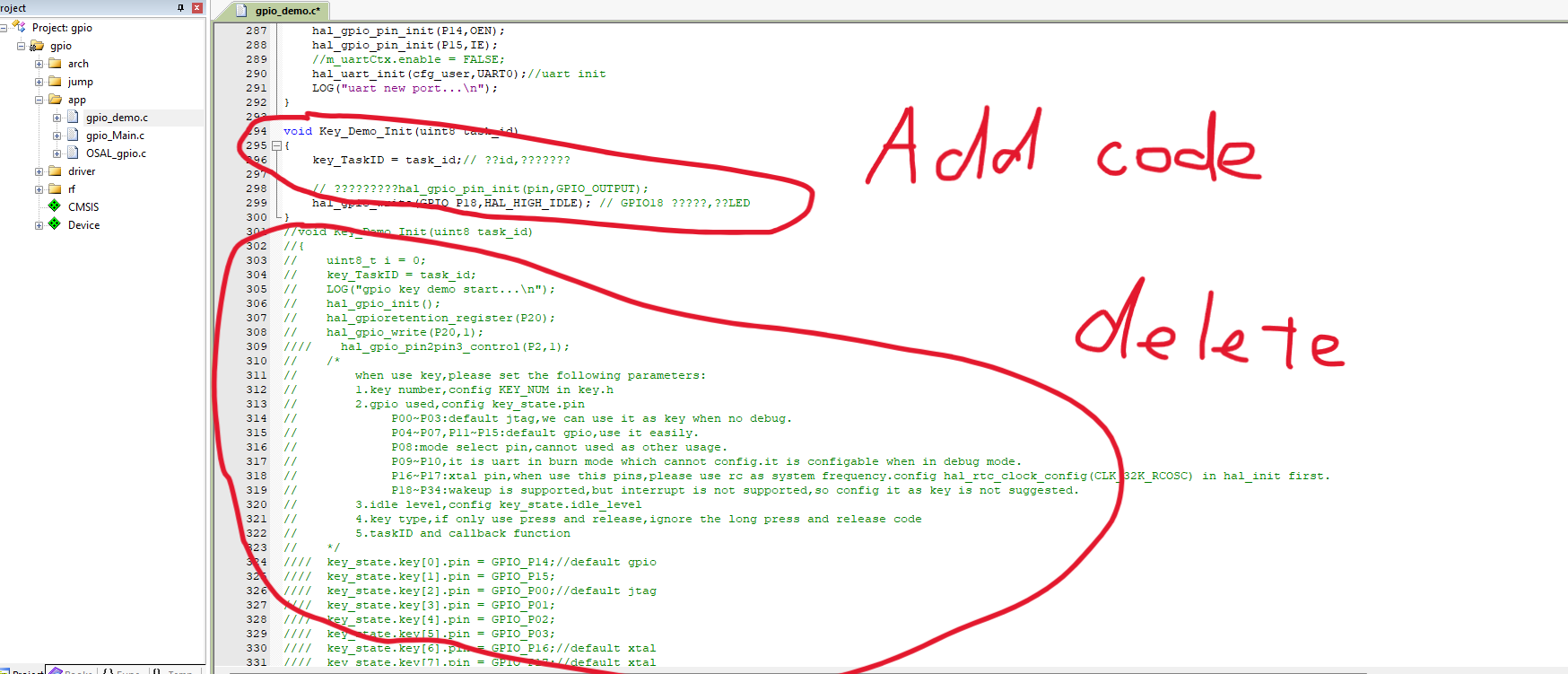 ### 最后一步的前一步 打开魔术棒,点击C/C++,将 `CFG_SLEEP_MODE=PWR_MODE_SLEEP` 修改为 `CFG_SLEEP_MODE=PWR_MODE_NO_SLEEP`。其目的是是开发板不会处于低功耗模式。 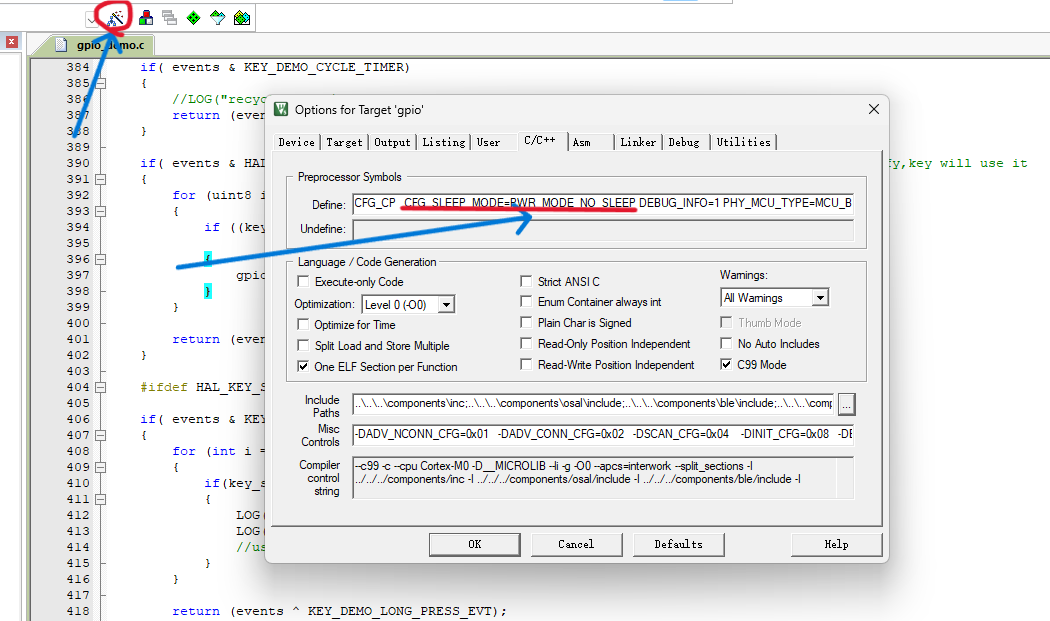 ### 最后一步 点击**编译**即可  会出现3个警告,但在我们点灯的路上不影响!!!! 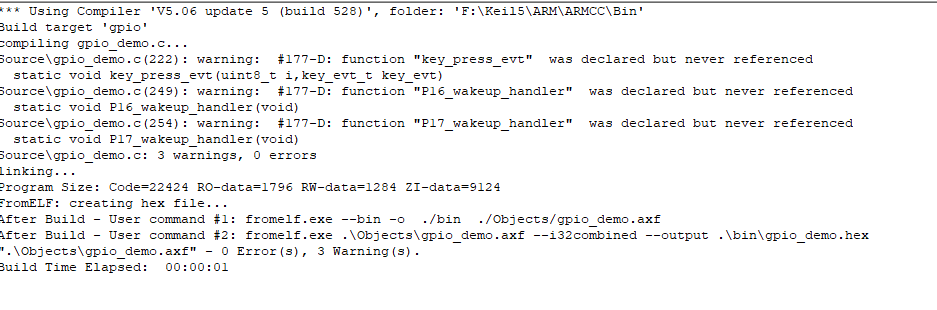 勾选HEX文件,会在bin文件夹下创建编译成功的hex文件。通过烧录软件烧录进去即可 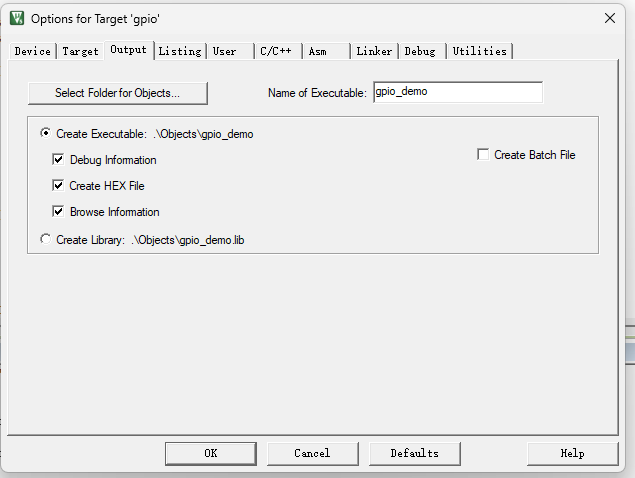 在此路径下可以找到我们刚刚生成的HEX文件,记住此路径 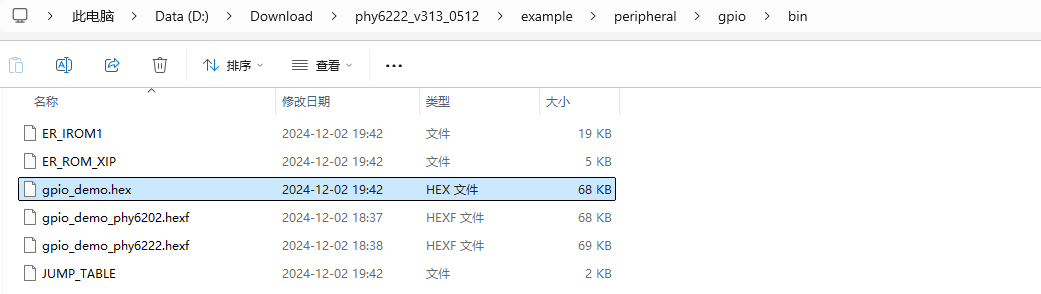 ## 5.烧录 双击PhyPlusKit.exe,运行,将开发板连接到电脑。查看开发板的COM。 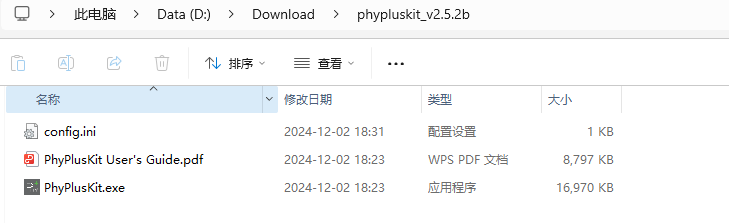 此开发板的波特率为115200,如果将波特率调为UXTDWU,串口会打印出如下信息。 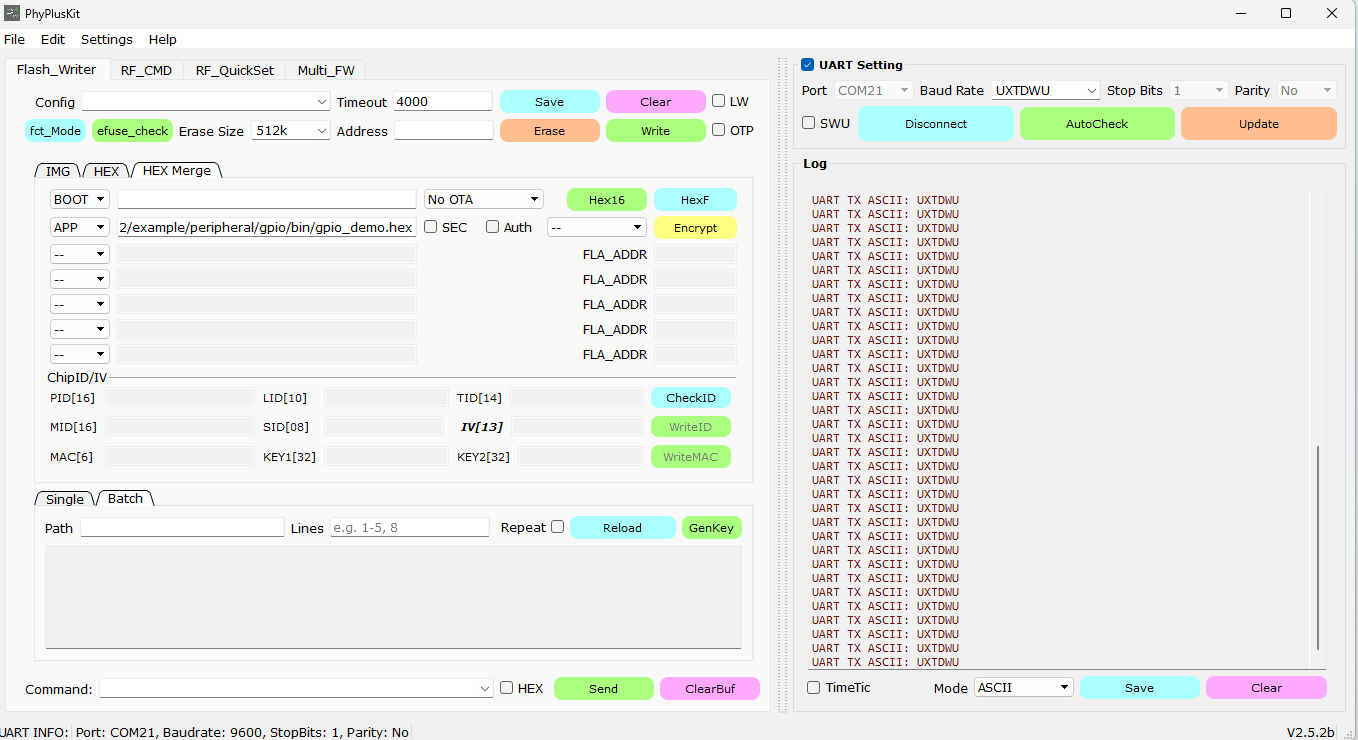 ## 敲黑板,此时,按住开发板的复位键一会,松开,出现 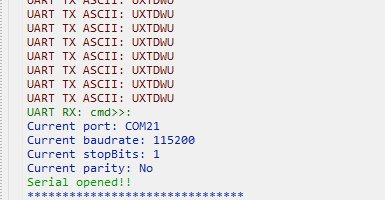 即可。波特率会自动切换到115200 1.首先擦除开发板里内容 2.双击APP,将刚才bin文件下的hex文件导入,最后点击wrtie写入即可 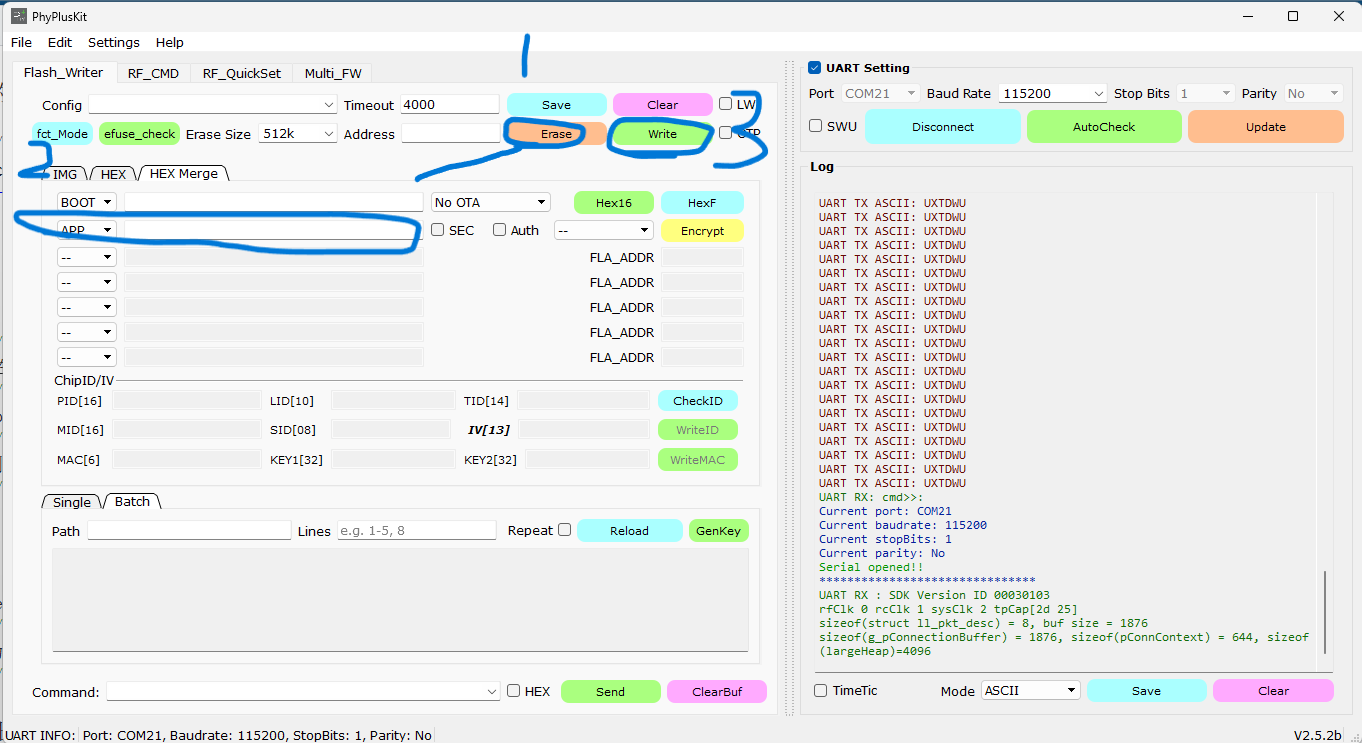 ### 烧录成功如图所示,将开发板与电脑重新连接电脑即可看见RGB灯已经亮起 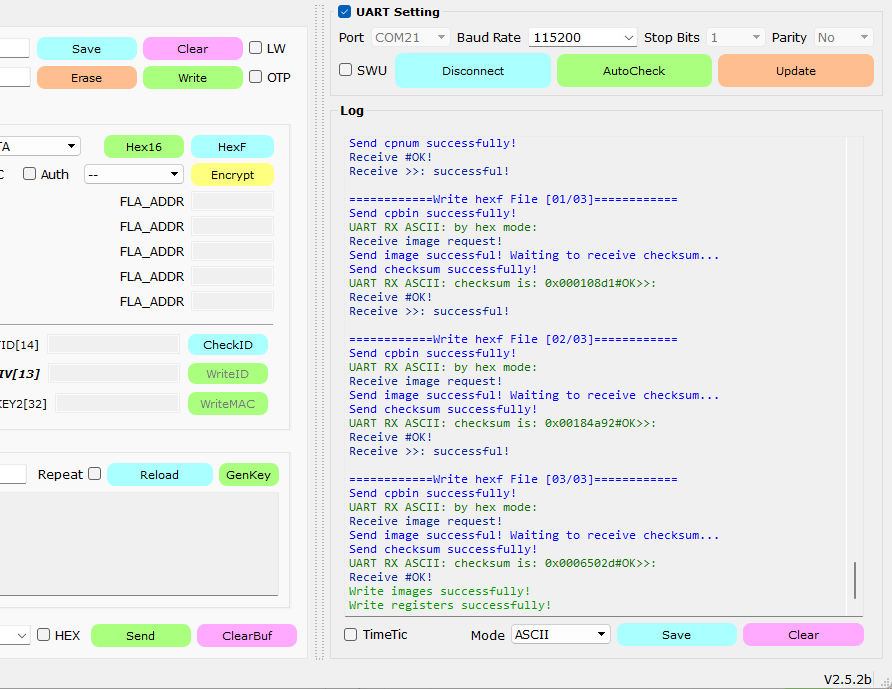 ### 如果出现以下报错信息 点击disconnect----->将波特率调回UXTDWU------>点击connect----->按住RESET一会,出现cmd------>再Erase(擦除)----->再(写入)write一遍就行了 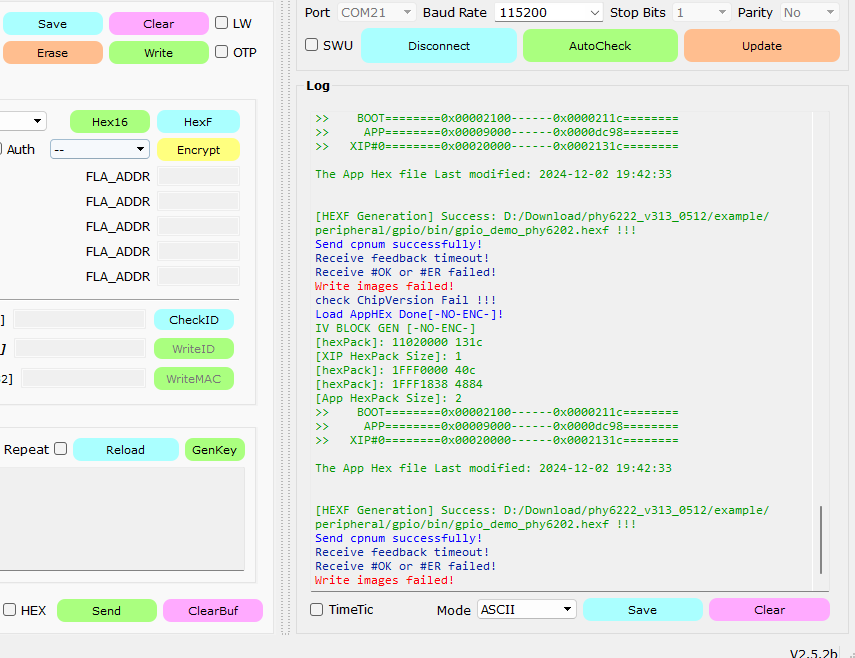 ## 点亮效果 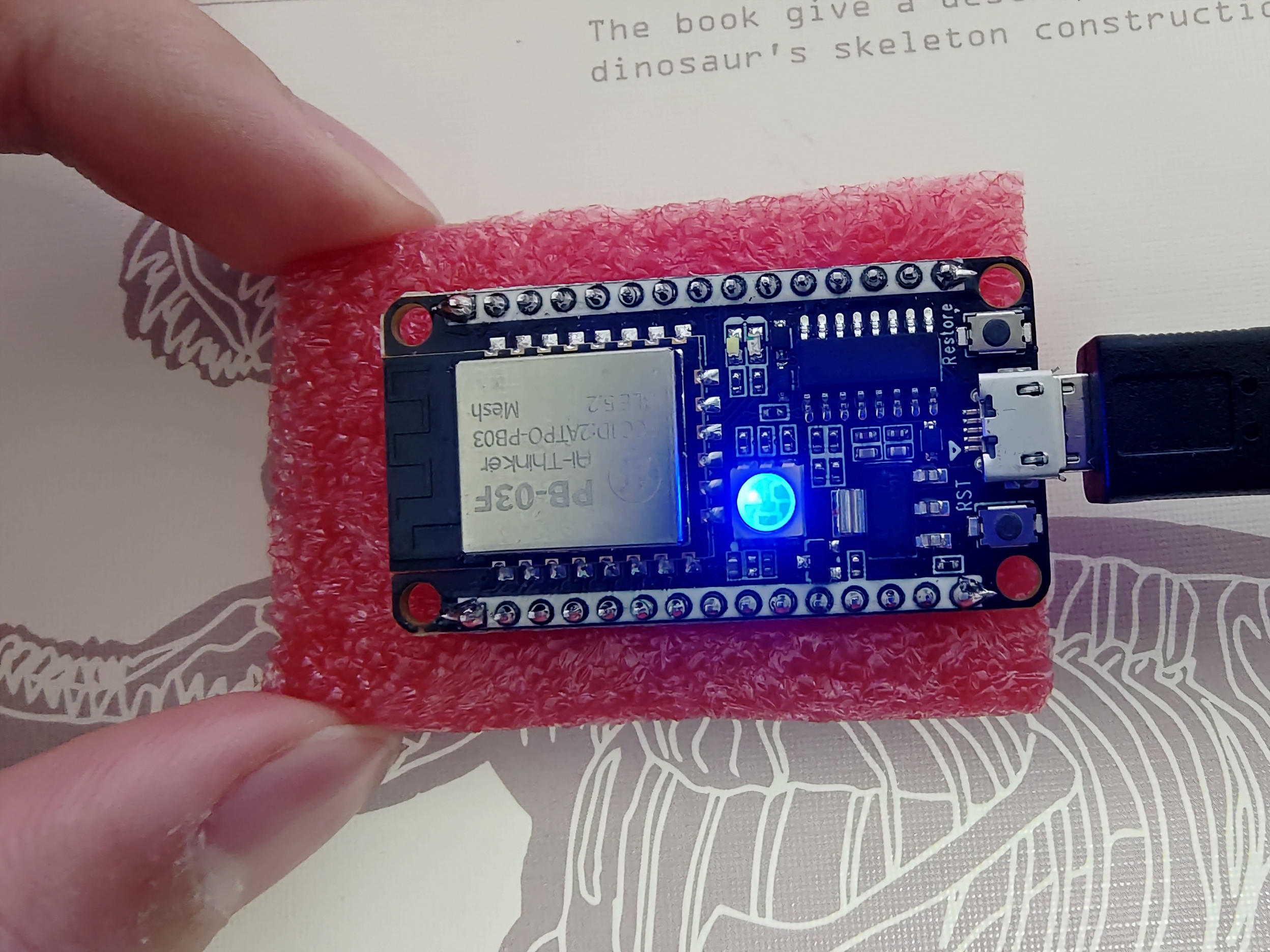 ## 视频连接 先挖坑,明天早上来填坑(已填坑) 2024.12.02 【[PB-03F]下载SDK+编译+点灯】[https://www.bilibili.com/video/BV1Q7zyY2Eg9?vd_source=8c1cff176f80c1bb4d19a3bb6cfbefc2](https://www.bilibili.com/video/BV1Q7zyY2Eg9?vd_source=8c1cff176f80c1bb4d19a3bb6cfbefc2) 2024.12.03
点赞
2
收藏
1
淘帖
0
────
2
人觉得很赞
────
回复
使用道具
举报
6 回复
电梯直达
正序浏览
倒序浏览
正序浏览
沙发
大猫的鱼
回复
使用道具
举报
2024-12-2 21:50:18
不错不错
回复
评论
使用道具
举报
板凳
l307921917
回复
使用道具
举报
2024-12-3 07:48:33
学习了,
回复
评论
使用道具
举报
地板
爱笑
回复
使用道具
举报
2024-12-3 08:36:17
写的不错,加上视频后,给你加个精华~
回复
评论
使用道具
举报
用心做好保姆工作
5
#
成为嵌入式高手
楼主
回复
使用道具
举报
2024-12-3 10:27:02
爱笑 发表于 2024-12-3 08:36
写的不错,加上视频后,给你加个精华~
已经填坑了
回复
评论
使用道具
举报
6
#
bzhou830
回复
使用道具
举报
2024-12-4 09:23:25
写的很好,准备跟着玩。
回复
评论
使用道具
举报
选择去发光,而不是被照亮
7
#
小小鸟
回复
使用道具
举报
2024-12-10 18:34:57
👍👍👍
回复
评论
使用道具
举报
B
Color
Image
Link
Quote
Code
Smilies
您需要登录后才可以回帖
立即登录
手机登录
点评
高级模式
本版积分规则
回帖并转播
回帖后跳转到最后一页
返回
今日推荐
【体验】Ai-WV02-32S 这不就跑起来了么
【问题】Ai-WV02-32S 短路
【B站/视频号直播预告】莫工带你跑通 AI→MCP 协议→硬件执行全
📘 一篇帖,把矽典微毫米波开发系列讲清楚
Ai-BV01-32S 参数全解析——一颗语音模组的底牌,规格书里没写的
第十期电子DIY——用 Ai-WV01-32S 打造一个会说话的AI 小玩意
【DIY小项目分享】AI语音便携可调电源
ai wb2 串口调试,疯狂输出乱码
BW16打板擦除失败是什么原因
我在Application中使能了blinky sample, 程序并没有运行
热帖排行
VC - 02 烧录问题
【体验】Ai-WV02-32S 这不就跑起来了么
关于bouffalo_sdk的环境搭建
【问题】Ai-WV02-32S 短路
【B站/视频号直播预告】莫工带你跑通 AI→MCP 协议→硬件执行全
📘 一篇帖,把矽典微毫米波开发系列讲清楚
Ai-WB2-12F问题请教
Ai-BV01-32S 参数全解析——一颗语音模组的底牌,规格书里没写的
统计信息
会员数: 31138 个
话题数: 42217 篇
首页
分类
我的